Build an EKS Private Cluster in Isolated Subnets with CDK
Guide to create a private Kubernetes cluster in AWS using CDK
Challenges
A common requirement of customers especially those in highly regulated industries like banks or healthcare when building their application in the cloud is to deploy it in an isolated environment or no internet access. This is to add extra protection to their workload and prevent its data from leaking out. In AWS, this is done by deploying in isolated subnets that have no Internet Gateways attached to the VPC or no proxies that connect to the internet. If your workload needs access to the AWS services you will then need to add the respective VPC Endpoints or AWS PrivateLink.
Adding the AWS PrivateLink is all good if you know what service endpoints you need to add but if an AWS service, for example Amazon EKS requires dependencies on other services that you are not aware of, then access to those services will be blocked until you add their VPC endpoints thus causing a cluster creation to fail.
Another obstacle is that when you use an IaC like the AWS Cloud Development Kit or CDK to build your infrastructure, its Constructs sometimes abstract the underlying implementations and you are not aware of what other AWS services they use. In this post, I will list down the services that need VPC endpoints when creating an EKS private cluster in isolated subnets using AWS CDK.
Architecture Overview
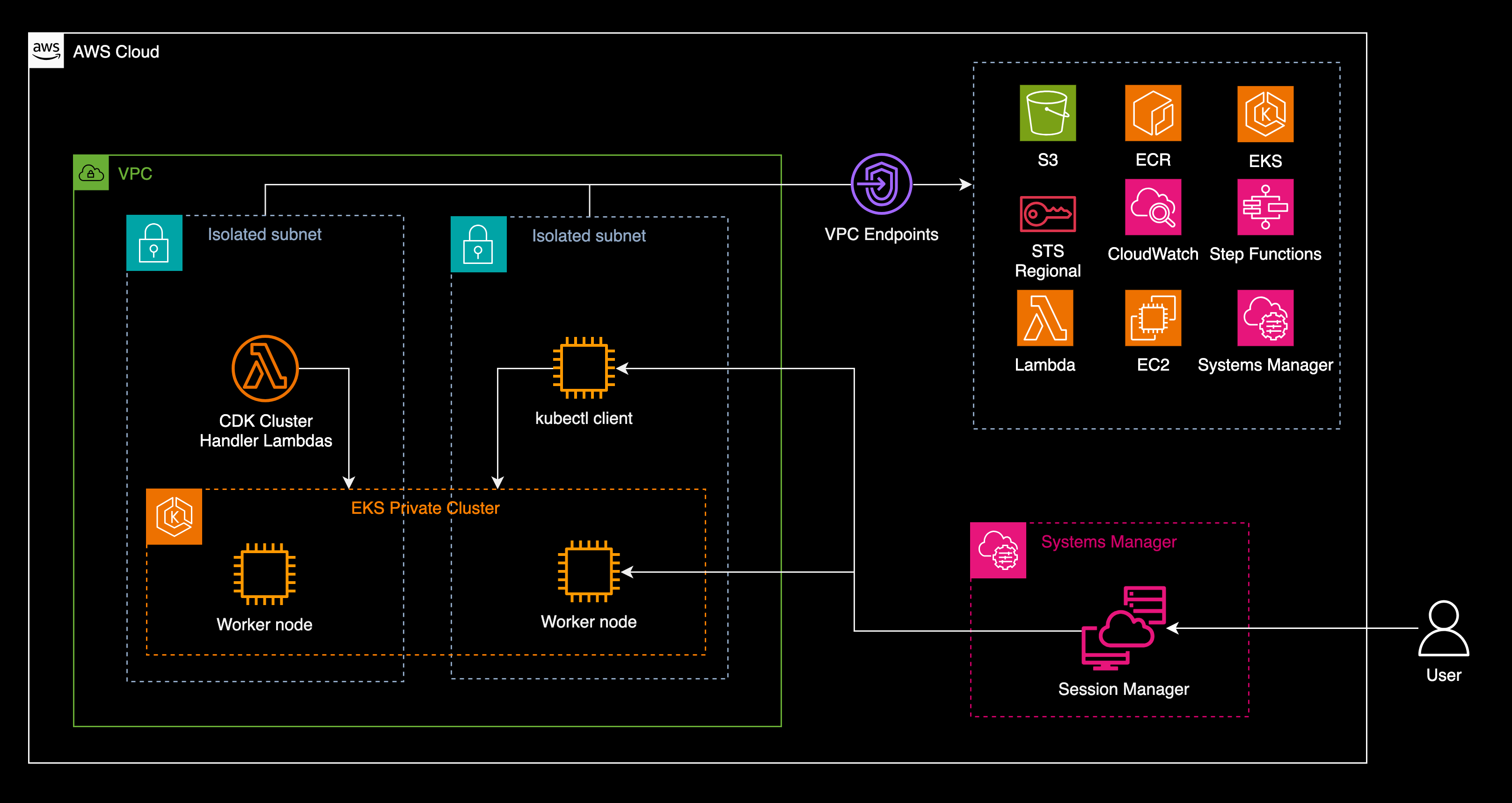 Architecture diagram of a private Kubernetes cluster in EKS on isolated subnets with the required VPC endpoints
EKS Private Cluster Creation
An EKS cluster is a Kubernetes cluster managed by AWS. When you use CDK to create the cluster, you can use constructs such as Cluster which is part of the package software.amazon.awscdk.services.eks in the Amazon EKS Construct Library in Java. Other languages are also supported, refer to the CDK documentation. To build the cluster, you call the class method Cluster.Builder.create(). followed by a bunch of configuration methods. Here’s an example.
1
2
3
4
5
6
7
8
9
10
11
12
13
14
15
16
17
18
19
private void createEksCluster(Role clusterAdmin) {
    this.cluster =
        Cluster.Builder.create(this, "eks")
            .vpc(vpc)
            .version(KubernetesVersion.V1_28)
            .vpcSubnets(
                List.of(SubnetSelection.builder().subnetType(SubnetType.PRIVATE_ISOLATED).build()))
            .endpointAccess(EndpointAccess.PRIVATE)
            .clusterName("eks-private")
            .kubectlLayer(new KubectlLayer(this, "kubectl-layer"))
            .defaultCapacity(0)
            .mastersRole(clusterAdmin)
            .placeClusterHandlerInVpc(true)
            .clusterHandlerEnvironment(Map.of("AWS_STS_REGIONAL_ENDPOINTS", "regional"))
            .kubectlEnvironment(Map.of("AWS_STS_REGIONAL_ENDPOINTS", "regional"))
            .outputClusterName(true)
            .outputConfigCommand(true)
            .outputMastersRoleArn(true)
            .build();
The full code in Java CDK is available in GitHub aws-samples.
If you look closely on the configurations, we are creating private isolated subnets and the Kubernetes access endpoint as private with the method calls to .subnetType(SubnetType.PRIVATE_ISOLATED) and .endpointAccess(EndpointAccess.PRIVATE), respectively. This ensures that the Kubernetes cluster has no internet access.
VPC Endpoint Dependencies
Now, the CDK construct will call other AWS services and assumes they are accessible. But since we told CDK to create it in private isolated subnets, you need to ensure that the respective VPC endpoints are created to provide access to these other services.
When creating a VPC endpoint you specify the service name. An EKS cluster obviously requires access to the EKS service which has the service name com.amazonaws.[region].eks where region is the AWS Region where it is deployed for example com.amazonaws.ap-southeast-1.eks. Amazon ECR is also needed. That is where the container images are pulled from. The ECR endpoint service name is com.amazonaws.[region].ecr.api and com.amazonaws.[region].ecr.dkr. These services including CDK also use Amazon S3 so an endpoint to it must be created. For S3 it is com.amazonaws.[region].s3.
When the EKS cluster scales, it creates or terminates EC2 worker node instances. This means it needs access to the EC2 service so we need to add com.amazonaws.[region].ec2. In our example, we also need EC2 to run the kubectl client. EKS also needs the AWS Security Token Service to manage the authentication of Kubernetes users, pods and services. So we also need com.amazonaws.[region].sts. For observability, Amazon CloudWatch(https://docs.aws.amazon.com/cloudwatch/) service needs to be accessed too. This is in com.amazonaws.[region].logs and com.amazonaws.[region].monitoring endpoints.
AWS recommends using AWS Systems Manager or SSM to manage the EC2 instances or EKS worker nodes. We need three endpoints to make SSM work. These are com.amazonaws.[region].ec2messages, com.amazonaws.[region].ssm and com.amazonaws.[region].ssmmessages. You can refer here for details on how these endpoints are used by SSM.
Lastly, CDK and its constructs use AWS Lambda cluster handler functions and AWS Step Functions to manage the creation and monitoring of the EKS cluster so VPC endpoints to these services are also required. For Lambda it is com.amazonaws.[region].lambda and for Step Functions you need com.amazonaws.[region].states and com.amazonaws.[region].sync-states.
List of VPC Endpoints
The following is a list of VPC endpoints required to create an EKS cluster in isolated subnets using CDK. For the full service names, append each endpoint with com.amazonaws.[region]..
- S3 -
s3 - ECR -
ecr.api,ecr.dkr - EC2 -
ec2 - EKS -
eks - Security Token Service -
sts - Cloudwatch -
logs,monitoring - Systems Manager -
ec2messages,ssm,ssmmessages - Lambda -
lambda - Step Functions -
states,sync-states
For reference, here’s the full list of AWS PrivateLink endpoint service names.
Once you have created all the above mentioned endpoints in your isolated subnets, you can try the CDK Construct to build the EKS Cluster. I have pushed the example and the full code on GitHub and is available in the aws-samples repository. Please refer to the README page that has the step-by-step approach to deploy and test the cluster.
This example is also referenced in the official AWS CDK documentation on how to create an EKS cluster in isolated subnets under the Amazon EKS Construct Library. Search for the keyword Isolated where a note is created to refer to our example.
Comments powered by Disqus.